- Home
- IT Help Desk
- IT Help Desk: Everything You Need to Know
IT Help Desk: Everything You Need to Know


Hagar Hadad
With over four years of experience in writing clear, research-backed technical content,...
More about the authorNovember 10, 2026
IT Help Desk
16 mins
Table of Contents

An IT help desk gives your employees a clear way to report technical issues, with agents resolving tickets across L1, L2, and L3 support to reduce downtime and maintain productivity.
However, ticket volume spikes, talent shortages, and the need for 24/7 multilingual coverage make this hard to manage in-house. This is why many businesses outsource their IT help desk.
If you’re weighing that option, compare providers on SLAs, security, and scalability, and then continue improving your IT help desk solution with automation, self-service, and AI.
What Is an IT Help Desk?
An IT help desk refers to the technical support a company offers its employees through a dedicated IT team or an outsourced service.
Its main goal is to help employees resolve IT-related issues, such as software bugs, network connectivity problems, and hardware failures. These services help minimize downtime, improve efficiency, and provide rapid resolution to technical problems.
What are IT Help Desk Services?
An IT help desk solution can be delivered in several ways depending on the needs of each business. It may operate as an internal function, with employees managing in-house IT resources, or be outsourced to third-party vendors that specialize in IT support, like FlairsTech.
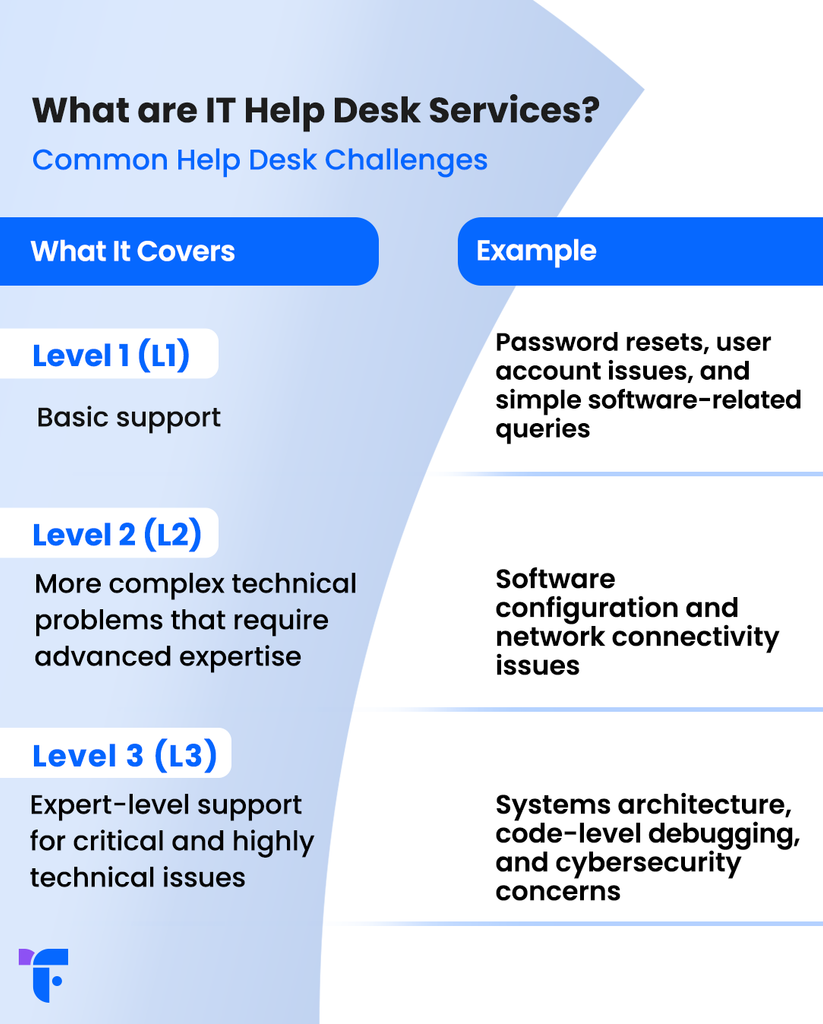
Throughout the years, these help desk services have been categorized into three important tiers, and each support level works on a ticketing system where problems are categorized, prioritized, or escalated until they’re resolved. These levels are as follows:
| Tier | What It Covers | Example |
|---|---|---|
| Level 1 (L1) | Basic support | Password resets, user account issues, and simple software-related queries |
| Level 2 (L2) | More complex technical problems that require advanced expertise | Software configuration and network connectivity issues |
| Level 3 (L3) | Expert-level support for critical and highly technical issues | Systems architecture, code-level debugging, and cybersecurity concerns |
How Does an IT Help Desk Work?
An IT help desk is the primary point of contact for resolving technical issues within any company. Below is an overview of how it works:
Reporting Issues
Your employees, whether they work in the office or remotely, use multiple channels like email, phone, chat, or a self-service portal to report issues. All issues reported are entered into the help desk system, creating support tickets.
Categorizing Tickets
The help desk system will then start sorting and prioritizing the tickets based on factors such as the nature of the issue, its severity, and urgency. This ensures that critical issues are given immediate attention and solved promptly.
Assigning Tickets
The ticketing system assigns tickets to relevant IT team members or departments. The system includes automated features that route tickets to the appropriate team members based on established criteria for each company.
Resolving Issues
Help desk agents work to fix the issues presented, using a knowledge base to address frequent problems, collaborating with colleagues, and updating the status of the tickets as they progress.
Providing Updates
The help desk platform provides ongoing updates between employees and IT staff. Users receive updates on the status of their tickets, and IT staff may request further details if necessary, facilitating the process.
Monitoring and Escalation
The system then tracks the status of each ticket. If an issue is not resolved within a specified time, it is escalated to a higher level of support or management to ensure timely resolution.
Closing Tickets
After the issue is resolved, the ticket will be immediately closed, with the solution documented for future reference. Users might also be asked to provide feedback on their experience.
Why Does Your Business Need an IT Help Desk Solution?
Most businesses rely on an IT help desk to keep their technology running smoothly, making reliable support an essential part of day-to-day operations.
Minimizing Downtime
One of the main functions of an IT help desk is to address and resolve technical issues as quickly as possible without system downtime. IT problems can result in outages, disrupting business operations and causing huge financial losses.
According to Uptime Institute’s Annual Outage Analysis 2026, 57% of respondents said their most recent major outage cost more than $100,000, and 1 in 5 reported costs above $1 million. To avoid this problem, your business needs an IT help desk that can identify and fix technical issues fast.
Boosting Productivity
When your employees run into an IT problem, they may try to solve it themselves or ask a coworker for help. So, one frozen laptop can pull two people away from their work. And the longer agents take to respond, the more hours users lose to these workarounds.
A well-organized help desk limits these disruptions, which enhances productivity across your organization.
Providing Expertise
You can’t expect every employee to know how to deal with IT issues, especially when problems can range from simple to complex.
Your help desk provides expert support to help users navigate these issues. Help desk technicians are trained to handle various technical challenges and offer solutions that non-technical users may not be able to reach on their own.
Meeting Security and Compliance Requirements
Businesses must adhere to strict data security and compliance standards. A strong IT help desk ensures that any issues relating to data breaches, system vulnerabilities, or compliance violations are quickly addressed, helping organizations maintain the required standards and avoid potential penalties.
Improving Employee Experience
The quality of IT support can have a lasting effect on how employees view their workplace. Slow responses, unclear communication, or unresolved issues can make everyday tasks more difficult and leave employees frustrated when they need technical help.
This matters even more during onboarding. Starting a new role without access to a working laptop, email, or essential systems can create unnecessary friction from day one.
A well-run IT help desk helps prevent these problems by preparing accounts and devices before new employees start.
Common Help Desk Challenges
While a help desk is important for maintaining business operations, it comes with its own set of challenges. Below are some of the common problems organizations face when managing IT help desks:
User Satisfaction
User satisfaction is a key metric of help desk performance. A slow response time, unhelpful solutions, or unresolved issues can lead to frustration and decreased productivity. Maintaining high user satisfaction requires a well-trained, responsive support team.
When employees can’t get help quickly, especially outside regular business hours, their work stops until someone answers. This is why it’s essential to have 24/7, user-focused support to improve satisfaction scores.
Scalability
Your IT infrastructure should be able to support growth without adding unnecessary complexity. Ensuring your IT help desk can scale to accommodate increased ticket volume is critical and, in many cases, a major challenge.
Without the ability to scale, your help desk may struggle to keep up with demand, leading to slower response times and a decline in service quality.
Operational Costs
While a help desk can boost revenue and improve productivity, running one still comes with costs, from agent salaries and training to ticketing software and after-hours shifts. On top of that, every new hire adds another user to support and more tickets for your agents to handle.
Talent Shortage
Finding skilled IT professionals can be challenging, especially as technology continues to evolve.
A talent shortage can lead to higher hiring costs, longer response times, and lower service quality. ManpowerGroup’s 2026 Global Talent Shortage survey of more than 39,000 employers found that 72% struggle to fill roles.
That leaves organizations competing for the same pool of qualified IT professionals.
Multilingual Support
Your employees may speak different languages, especially if your business has offices or remote teams in multiple countries. Even employees who use English at work every day may struggle to explain a technical problem clearly, which can lead to unnecessary back-and-forth and misunderstandings.
Your help desk needs agents who can support employees in the languages they’re most comfortable using. That may mean hiring multilingual IT professionals or working with a provider that offers support in multiple languages.
New Tools
Your company probably keeps adding new software, from collaboration platforms to AI assistants. Each new tool brings login issues, permission requests, and how-to questions your agents may not have dealt with before.
Your help desk team needs to understand each system before employees start using it. Otherwise, a new rollout can leave your agents learning the software while trying to support the people using it.
What Is IT Help Desk Outsourcing?
IT help desk outsourcing is the practice of using an external provider to handle an organization’s IT support and help desk operations. Outsourcing your help desk lets your employees focus on their main workflows and keeps your IT systems operational and secure.
Outsourcing offers many benefits that companies value. These benefits include the following:
Cost Savings
One of the biggest advantages of outsourcing is the huge potential for cost savings, especially for mid-market businesses.
Maintaining an in-house IT team can be expensive, especially when you factor in the costs of hiring, training, and retaining skilled professionals. Outsourcing to a third-party provider offering IT help desk services lets businesses reduce these costs and maintain access to expert support.
24/7 Support
IT issues can arise at any time, especially if your business is international. This means your organization needs round-the-clock support, and this usually cannot be achieved with an in-house team.
With 24/7 support, IT help desk providers can assist users anytime, even outside regular business hours. This is especially valuable for global companies or those with employees working across different time zones.
Access to Skilled Professionals
Outsourcing provides businesses with access to a larger pool of skilled IT professionals who have experience handling a wide range of technical issues.
Whether you need L1 support for routine troubleshooting, L2 support for more complex technical problems, or L3 support for advanced issues requiring specialist expertise, an outsourced team can provide the right skills at each level. This enables you to resolve problems efficiently and ensure that your IT infrastructure remains strong
Scalability and Flexibility
If your business is growing, you’ll need to scale your IT support accordingly. Outsourcing provides this scalability, allowing businesses to adjust the level of support they need without hiring additional in-house staff.
Also, during slow seasons, you can scale back your IT support capacity to avoid overpaying.
Improved Focus on Core Business Functions
By outsourcing help desk support, businesses can free up internal resources to focus on their core responsibilities, such as product development, marketing, and customer service.
Your provider manages incoming IT requests and technical issues, reducing the pressure on your internal team.
How to Choose the Right IT Help Desk Provider
Choosing the right IT help desk provider is a critical decision that affects the overall success of your IT operations. If the vendor can’t deliver the support your business needs, technical issues can quickly disrupt your day-to-day operations.
Here are some key factors to consider when selecting a provider:
Experience
Experience should be one of the first things you consider when vetting potential providers. You want a company with a proven track record of delivering high-quality IT support services.
Check their client portfolio and seek out testimonials or case studies that demonstrate their ability to handle a range of IT challenges.
Support Channels
Make sure the provider offers multiple support channels that match your organization’s needs. This could include phone support, email support, live chat, or even on-site support. A wide range of options ensures employees can get help through their preferred channel.
Response Time and SLAs
Look for a provider that offers fast response times and strong Service Level Agreements (SLAs). SLAs define the level of service you can expect, such as response and resolution times.
Your SLAs should also explain what happens if the provider falls short on those benchmarks. A common example is service credits, which are discounts the vendor owes you for each missed target.
Security and Compliance
It’s also crucial to choose a provider that follows the best practices for security and data protection. This is one of the most important factors to keep in mind when curating your shortlist.
Make sure the provider is ISO 27001- and GDPR-compliant, especially if your business handles sensitive or personal data.
Scalability
As we mentioned earlier, being able to scale your IT help desk solution is essential as your business grows. Choose a provider that can meet your evolving needs, so you won’t have to switch vendors as your requirements change.
Cost-Effectiveness
While you shouldn’t base your decision on cost alone, it’s still an important consideration. Compare pricing models from different providers to make sure you are getting the best value for your money.
Look for flexible pricing that allows you to adjust your plan as your needs change, and always keep quality in mind when comparing quotes.
Reputation and Reviews
Before choosing a provider, look into their reputation and track record. Look for online reviews, industry certifications, and references from existing clients. This will give you a better idea of the quality of their IT help desk support.
How to Improve Your IT Help Desk Solution
Improving your IT help desk is an ongoing process that involves optimizing workflows, adopting new technologies, and making sure your team is well-equipped to handle a variety of issues.
Invest in Automation
Automating repetitive tasks, such as ticket routing and triage, can greatly improve the efficiency of your help desk. This reduces time spent on tasks other than helping users.
For instance, the system can send a password reset request straight to an automated reset link and route a server access issue to the appropriate L2 agent without manual sorting.
Offer Self-Service Options
Self-service portals and knowledge bases are the future. They are valuable resources for users. Many customers now prefer to find solutions themselves without help.
Providing easy access to troubleshooting guides and FAQs can help them resolve minor issues on their own, reducing the volume of tickets submitted to your help desk.
Provide Regular Training
Regular training is essential for keeping your help desk team up to date with the latest technology trends and best practices. Training should cover both technical skills and customer service skills to ensure that your team can provide efficient and friendly support.
Monitor Performance Metrics
Setting key performance indicators (KPIs) for your help desk enables you to track performance and identify areas for improvement. Key metrics might include ticket resolution times, user satisfaction ratings, and the number of open tickets.
Use Advanced Ticketing Systems
If your budget allows, invest in an advanced ticketing system that streamlines workflows, tracks issues, and improves communication between the help desk team and users.
The best systems provide a centralized dashboard, making it easy for support staff to manage multiple tickets at once.
What to Expect from Help Desks in the Future
Your help desk will continue to evolve as technology advances, business needs change, and user expectations rise. Here are some key trends and developments that businesses can expect in the coming years:
Increased Use of Artificial Intelligence (AI) and Machine Learning (ML)
One of the most important trends in the future of IT help desks is the integration of AI and machine learning to automate routine tasks and enhance the support process.
AI-powered chatbots and virtual assistants already handle basic inquiries and guide users through troubleshooting steps. In the next few years, these tools are expected to become more intelligent and capable of resolving complex issues without human intervention.
Automation and Self-Service Solutions
More businesses and users are choosing to solve problems independently, which drives demand for self-service options.
Help desks will likely integrate more advanced self-service portals filled with knowledge bases, automated troubleshooting tools, and even video tutorials to help users fix common issues on their own.
Enhanced Focus on Data Security and Compliance
As reliance on digital systems grows, data security and privacy concerns are becoming a more critical focus for help desk teams. Evolving cyber threats and stricter regulations, including GDPR and CCPA, mean that IT support processes must meet increasingly rigorous security and compliance requirements.
Support teams should be trained in best practices for safeguarding sensitive information and responding to security incidents, like phishing attacks, data breaches, and system vulnerabilities.
Future IT help desk solutions will include more automated security features, such as AI-driven threat detection, integrated into support systems to prevent and respond to incidents in real time.
How FlairsTech Can Help Your Business
At FlairsTech, we provide comprehensive IT help desk services that meet businesses’ diverse needs. With over 280+ support agents and 50+ multi-level IT experts, we deliver reliable, scalable, and high-quality support.
Our 150+ certified developers bring expertise across 80+ technologies. They leverage the latest skills and tools to offer tailored IT solutions that help you stay ahead of the competition.
Depending on how much of your IT operations you’d like to outsource, you can choose from four ITSM (IT Service Management) models:
- IT as a service: We provide a dedicated 24/7 IT team that manages support and administration at every level, so your systems remain operational around the clock.
- Service desk as a service: Our agents resolve your employees’ software and hardware issues through 24/7 L1 and L2 support.
- IT admins as a service: Our administrators set up, maintain, and monitor your IT infrastructure. On top of that, they resolve the complex issues your service desk escalates.
- Cloud computing administration: We manage cloud platforms such as Microsoft Azure and AWS to ensure your business remains agile, secure, and optimized.
- Data migration: We move your business from Microsoft 365 to Google Workspace, from Google Workspace to Microsoft 365, or from on-premises environments to Azure.
Your IT help desk should give employees quick, reliable support when technical issues get in the way. So, if you’re ready to cut downtime, book a consultation with us, and we’ll design a support model around your business.
Frequently Asked Questions
What does an IT help desk do?
It provides support for employees experiencing technical issues. This support can range from answering basic questions to troubleshooting complex technical problems. IT help desks are typically structured in tiers (L1, L2, L3) to address varying levels of complexity.
Why are IT help desks important for businesses?
By resolving problems quickly, an IT help desk team can reduce downtime, minimize disruption, and help your staff stay productive. These experts also keep your IT environment secure and compliant by managing access requests and spotting potential security issues.
What is IT help desk outsourcing?
It refers to the practice of contracting third-party vendors to manage a company’s IT support needs rather than handling them internally. This lets businesses reduce operational costs, access specialized expertise, and scale support more easily.
Outsourcing can provide 24/7 coverage, multilingual support, and faster resolution times by leveraging external experts and technology.
What are the most common IT help desk challenges?
Common challenges include user satisfaction, scalability, operational costs, talent shortages, the need for multilingual support, and new tools.
How do I choose the right IT help desk provider?
Look for hands-on experience, scalability, technology tools, security standards, and proven user satisfaction. Make sure they offer 24/7 support and understand your industry’s needs.
How can businesses improve their IT help desks?
By using automation, offering self-service options, providing ongoing staff training, tracking performance, and upgrading support tools.
What is the future of IT help desks?
The future will bring more automation, AI-driven support, cloud integration, and predictive support that anticipates issues before they arise.
Was this article helpful?

I use 8 years of content excellence experience to ensure everything you read is accurate, backed by real industry data and insights.